
UserDefaults
UserDefaults Inspector for iOS Simulator
SimDock’s UserDefaults tool shows the preferences of the app selected in SimDock, on the iOS Simulator selected in SimDock — and lets you change them while the app runs. Nothing is added to your project.
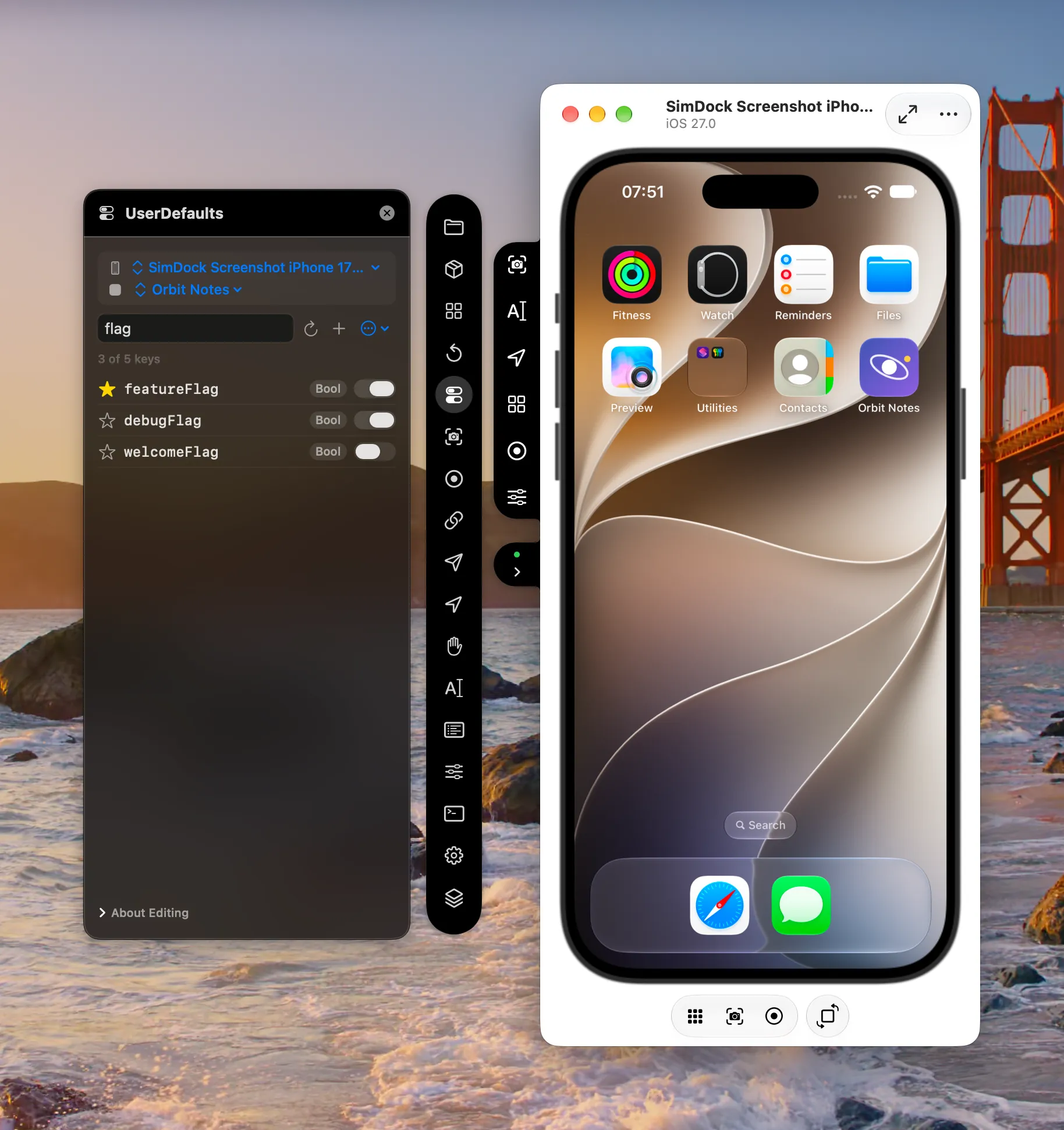
The problem it solves
While developing, you often need to know what an app has stored in UserDefaults — a feature flag, an onboarding state, a cached setting — or to change it to reach a particular state. Without a tool, that means finding the preferences plist inside the simulator’s data container, or typing defaults commands with the right device and bundle identifier by hand. And the plist on disk can lag behind what the app has just written.
How SimDock reads and writes preferences
SimDock runs Apple’s own defaults tool inside the simulator throughxcrun simctl spawn <device> defaults -container <bundle-id>. Because that goes through the simulator’s preferences system rather than the file on disk, it sees values the app has written even before they are flushed to the plist.
Changes are written by importing a one-key property list on standard input, so the key and value never appear on a command line. An import merges: every other key stays as it was. After writing, SimDock reads the preferences back and tells you if the app has since replaced the value.
What you can do
- Browse every top-level key, sorted by name, with its type and value.
- Search keys to narrow a long list.
- Refresh to read the preferences again and see what the app just wrote.
- Edit values: Boolean switches apply as soon as they’re flipped; other values apply when you save.
- Add a new key, or delete one after a confirmation.
- Copy a key or its value.
- Favorite keys you check often. Favorites are kept in SimDock only, never written to the app.
- Clear All removes the app’s preferences — only after a confirmation that names the app and the simulator it will clear.
Limits
- The list updates when you refresh. SimDock doesn’t watch the preferences continuously, so a value the app writes later appears on the next refresh.
- Data, array and dictionary values are shown but read-only. Very large values can’t be written from SimDock.
- The app sees a change right away through
UserDefaults, but a value it already copied into its own state updates only when it reads the key again or relaunches. - SimDock works with the domain named after the app’s bundle identifier — the one
UserDefaults.standarduses. - The simulator must be booted and the app installed on it.
Does my app need changes?
No. There’s no SDK, framework or debug hook to add. SimDock works with apps installed on the simulator, using supported simulator tooling only.